State mismatch between tab and result view
High impactSometimes the app looked like one mode and sounded like another. That is especially disorienting in Places, because the map/list switch changes how people understand everything on the screen.
Case study / Wikipedia iOS app
I audited the Places tab in the Wikipedia iOS app as part of a five-week accessibility review. My goal was simple: if someone uses VoiceOver, larger text, or touch accommodations, they should still know where they are, what places are nearby, and what action to take next.
Project snapshot
Places is a small tab with a lot happening at once: a map, a list, search, filters, saved actions, distance labels, and location controls. That made it a good stress test for accessibility, especially because the screen has to work both visually and through VoiceOver.
Problem statement
The problem was bigger than a missed label. A Places screen only works when people can trust the current view, understand what is nearby, and move through results in a sensible order. During the audit, that trust broke down in a few important moments.
Sometimes the app looked like one mode and sounded like another. That is especially disorienting in Places, because the map/list switch changes how people understand everything on the screen.
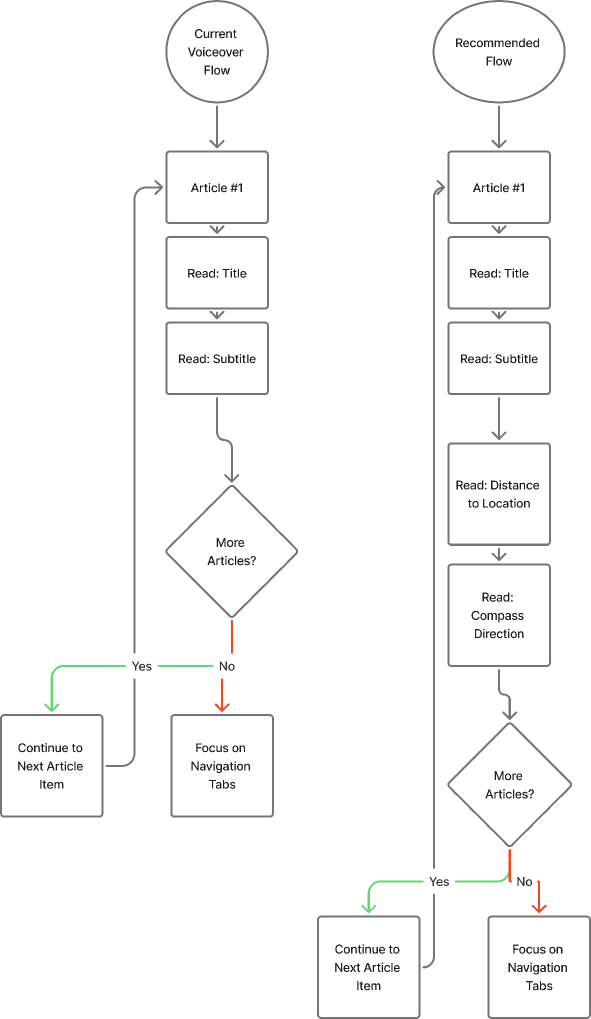
Distance and direction are not decorative metadata here. They are the reason a nearby-place result is useful, so skipping them makes the list much harder to judge.
The new visual style made some text and controls feel too delicate. If the background changes, a subtle button or label can go from polished to hard to read very quickly.
Research process
I moved between the live app, VoiceOver, Figma notes, and the team deck. Instead of treating issues as isolated defects, I asked what each one would feel like for someone trying to quickly find a nearby Wikipedia place.
Aligned with the team on the Wikipedia discovery flows we were responsible for reviewing.
Grounded the audit in two user personas and the new iOS visual direction.
Tested Places with VoiceOver, visual review, larger text, and touch target checks.
Sorted what I found by user impact so the Places story did not get lost in details.
Turned the audit notes into changes a designer or engineer could use.
Listened for what VoiceOver made clear, what it skipped, and where the order became confusing.
Looked at whether controls still felt readable and tappable against the map and dark interface.
Checked whether place names, distances, and controls could breathe when text got larger.
Key findings
Touch navigation, VoiceOver navigation, and larger-text use did not always line up. That gap mattered most in Places because location is contextual: people need order, distance, direction, and clear state to decide what to open.
When the app says one view is active but shows another, the user has to guess what state they are in.
Why it matters: a map/list toggle should reduce complexity, not add another layer of uncertainty.
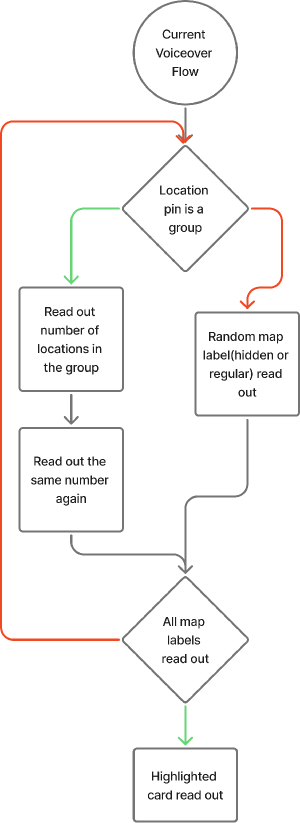
Road names and other background labels could become part of the VoiceOver path, even when they were not helping the task.
Why it matters: hearing extra map noise makes the real nearby results harder to find.
Distance, compass direction, and current location should sit near the front of the experience, not feel buried in the order.
Why it matters: nearby places only feel nearby when the app explains the relationship to where you are.
Focusing an image alone does not tell the user enough. The useful object is the full place result with title, distance, context, and actions.
Why it matters: users should not have to reconstruct a card from separate fragments.
Places has a dark interface, map imagery, translucent controls, and many small actions. That combination needs stronger contrast and touch spacing.
Why it matters: users should be able to identify actions quickly without hunting for them.
When names, distances, and controls scale up, fixed-height rows stop feeling reliable. The result becomes harder to scan instead of easier to read.
Why it matters: text scaling should make the Wikipedia app more comfortable, not more crowded.
Audit evidence
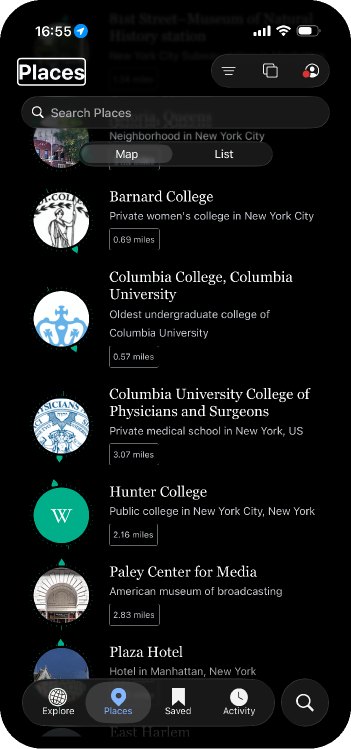
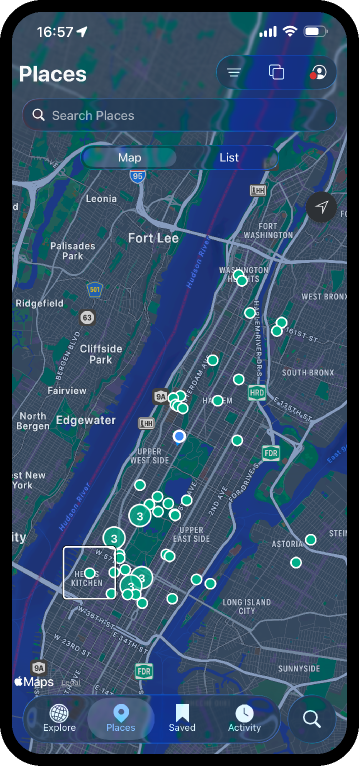
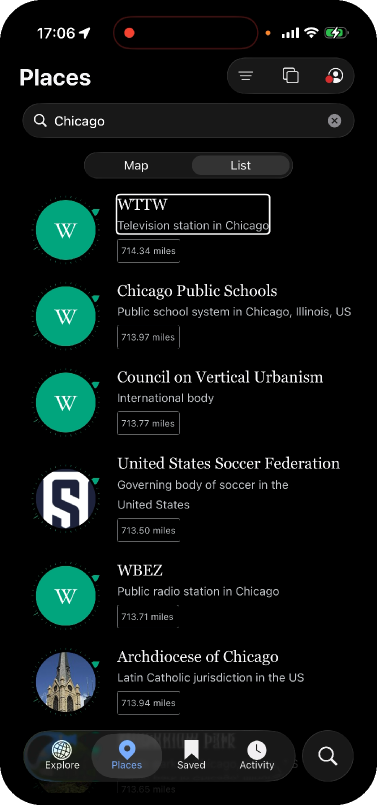
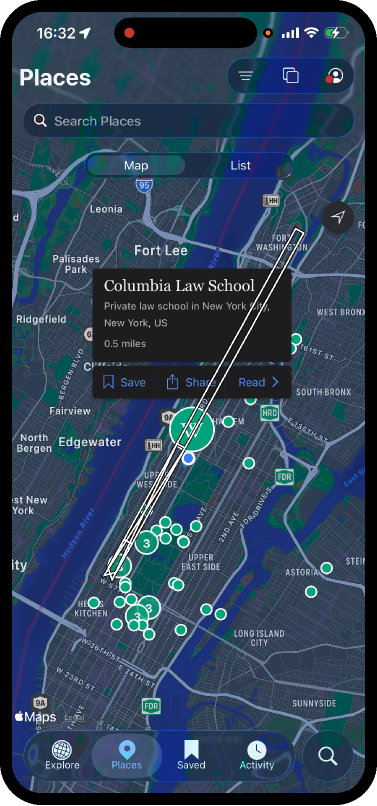
These app captures show the Wikipedia Places tab in both list and map contexts, including the mismatch between the selected control and the information VoiceOver needs to explain.
Evidence model
The review became easier to communicate when each failure was framed as a broken promise: state should be stable, nearby places should be understandable, controls should be reachable, and visual information should remain legible under real accessibility settings.
Selected tab, rendered view, and VoiceOver announcement must describe the same state.
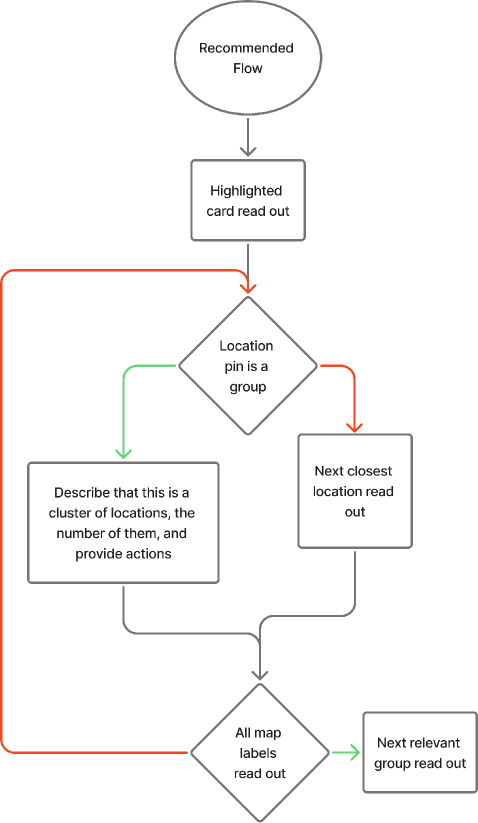
Focus order should start with the most useful nearby places and expose current location early.
Distance, compass direction, group labels, and card titles need to be announced together.
Cards and controls must survive larger text, touch accommodations, and contrast changes.
Proposed strategy
The recommendation was to stop treating every visual object as a separate stop. In the Wikipedia Places tab, VoiceOver should first explain the meaningful result, then let people drill into actions when they need them.
Keep the selected control, visible content, and VoiceOver announcement in sync.
Let people move through nearby pins in a clear order, and keep background map labels out of the way.
Read the title, distance, direction, and available actions as one meaningful result.
Let rows grow, keep controls easy to tap, and make contrast strong enough for real map backgrounds.
Recommendations
Reflection
This project made accessibility feel less like a checklist and more like the foundation of the product. In a location screen, state, order, and spatial context are the experience. When any one of those breaks, the whole screen becomes harder to trust.
Touch users and VoiceOver users should be able to answer the same questions: where am I, what is closest, what can I do next, and what changed after I acted?
The screenshots and flow diagrams helped me point to exact moments: the card split into pieces, the current-location control came too late, and map labels interrupted the task.
Translucent surfaces can look polished while weakening legibility. The audit reinforced that visual systems need accessibility tokens, contrast testing, and Dynamic Type checks built into normal review.
The recommendations now connect what users feel with what the team can change, without turning Places into a simpler or less useful feature.